Music schools and conservatories
A digital score space for every class and every ensemble.
The institution subscribes once and opens a space for each class or ensemble. Each teacher prepares their space’s repertoire; students receive it, each with their own part, with no phone numbers exchanged.
6 months free · no card needed, no commitment
Works offline Computer, tablet, phone

Today
The small frictions of a music school’s everyday life
Scores going round everywhere
Sent on WhatsApp, by email or on a Drive, in several versions: every class has its habits, and nothing is shared across the school.
Students’ phone numbers
To send a score or a recording, people end up exchanging numbers, outside the setting the school controls.
Practising at home
The student leaves without their part, without the starting note, without a recording to practise with, and the next lesson starts over.
Ensembles and recitals to organise
The youth orchestra, the choir, the end-of-term recitals: parts, attendance and the programme for families live in separate files.
Keeping control of the data
Personal accounts, messaging groups, documents shared by everyone: the school no longer knows what goes round, or where.
For the school
What NoteStand does for classes and students
The repertoire, rehearsals and concerts are described on the home page. Here is what serves a music school first.
One subscription for the institution, one space per class
The institution subscribes once, at the education rate, and opens a space for each class or ensemble: 5 to 10 spaces, up to 30 members and 50 pieces per space. Beyond 10 spaces, contact us.
- Repertoires stay separate from one class to the next. See the education rate ›
No phone numbers exchanged
Scores and recordings no longer go round on WhatsApp, email or Drive: everything goes through the class space, in the latest version, with invitations by email.
- Only invited members see a class’s space and its repertoire.
A safe setting, for the administration and for families
Every student, every teacher can report a document or a problem in their class’s space, and turn down an invitation by blocking its sender.
- Reports from a class go to the administration, which handles them; NoteStand gets a copy and can step in at any time.
- NoteStand acts within 24 hours on inappropriate or illegal content.
- Families know that scores and recordings go through the class space, not through messaging apps or phone numbers.
Each teacher prepares their class
The teacher manages their class’s space: they prepare the repertoire there, invite their students and annotate the scores for everyone, on the shared layer.
- Each student keeps their own annotations, on top of the teacher’s.
Students practise their part
In My stand, the student opens the pieces they are working on, their part highlighted, with the starting note. On an engraved score, they mute the other parts and listen to theirs, played by the instrument of their choice.
- A practice recording can be attached to the piece, alongside the score.

Ensembles and recitals
The youth orchestra or the school choir have their own space. A recital is prepared like a concert: parts assigned, attendance, the programme for families, printed or online.

The administration stays in control
From a dedicated screen, the administration manages spaces, seats and invitations. The institution remains responsible for its students’ data; NoteStand processes it on its behalf.
An example
A year with NoteStand: a conservatory opens a space for each class and for its orchestra
A management team, teachers, students, lessons and a recital: here is how NoteStand is used, from September to the end of term.
- SeptemberThe management
They subscribe at the education rate and open eight spaces: the piano, guitar and singing classes, music theory, the youth orchestra and the choir. They invite the teachers, each managing their own space.
- The following weekEach teacher
They prepare their class’s repertoire — PDFs, MusicXML files, recordings —, set the starting notes and invite their students by email. Nobody exchanges phone numbers.
- Every weekIn lessons
The teacher annotates a score with a stylus during the lesson: the student finds the annotation at home, in the latest version, with nothing sent on a messaging app.
- At homeA flute student
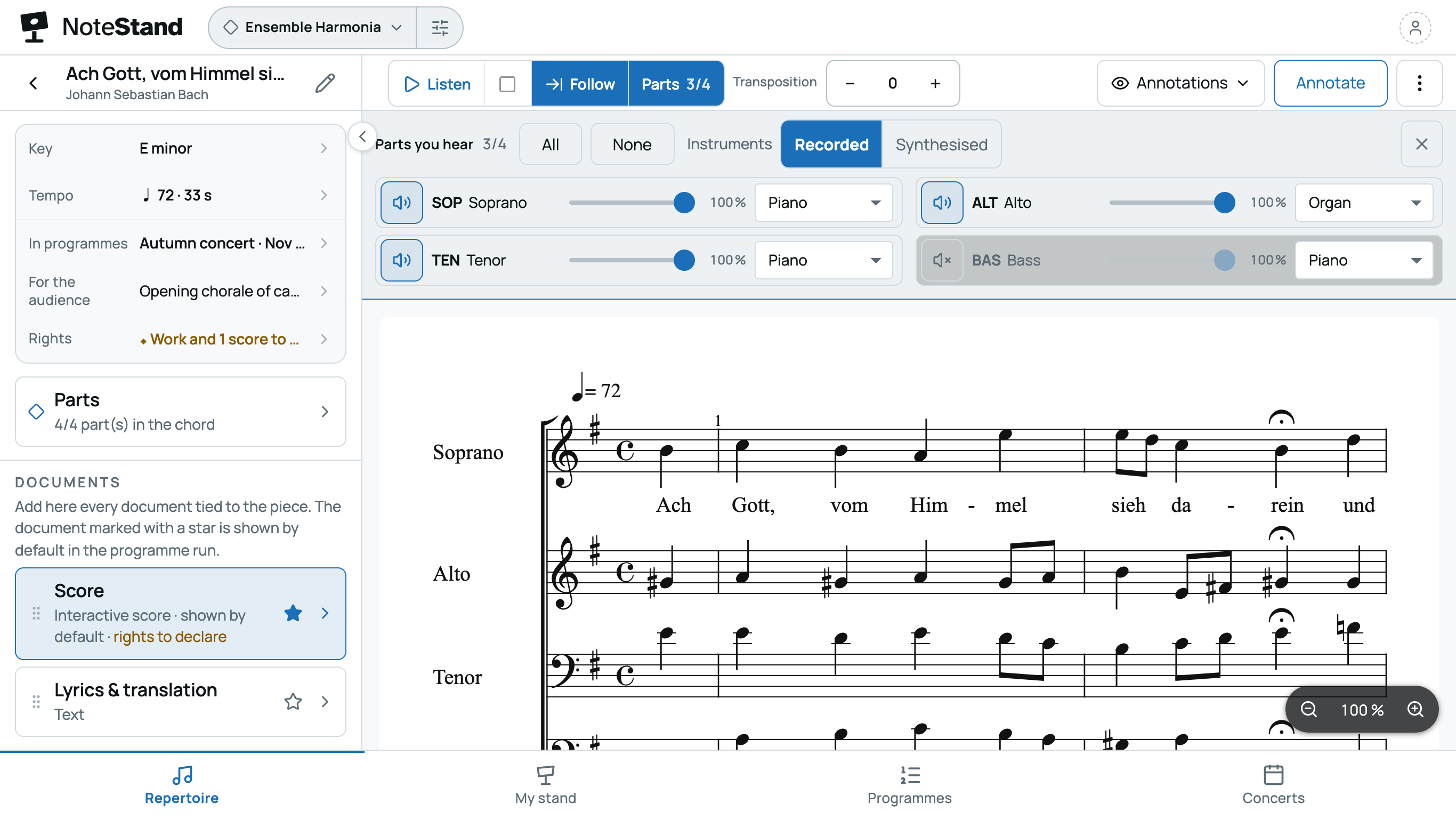
In My stand, she opens the piece of the month and, on the engraved score, mutes the accompaniment and listens to her part, then plays it with the accompaniment alone. She adds her own cues, which only she sees.
- DecemberThe youth orchestra
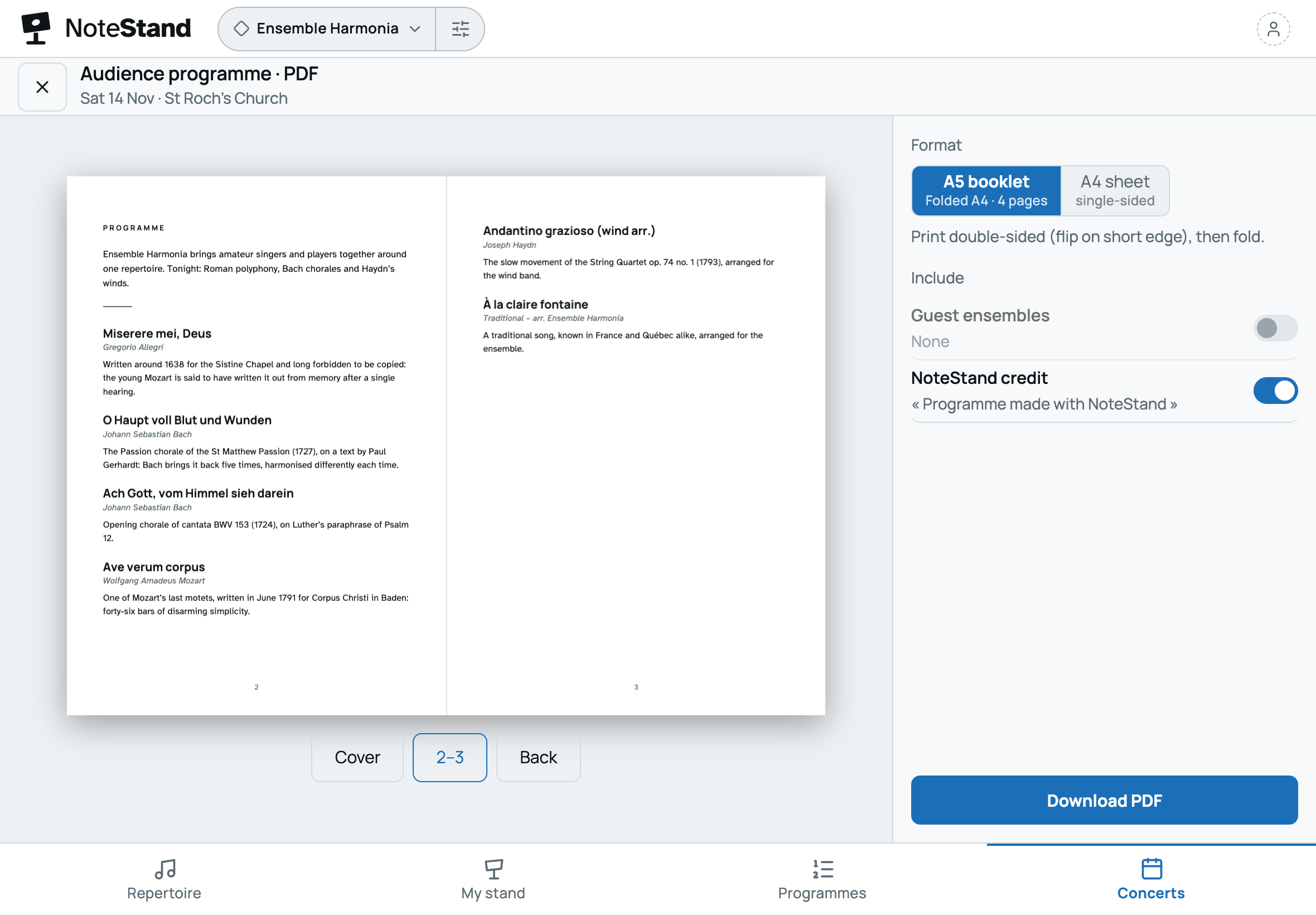
The teacher prepares the recital like a concert: parts assigned piece by piece, students answering present or absent, the programme for families, in a printed booklet or online. Organise the concerts ›
- Through the yearThe administration
A student reports a document in their class’s space: the administration receives the report and handles it. From its screen, it manages the seats and invitations of every space.

Frequently asked questions
Your questions about NoteStand for a music school
How many spaces can the school open?
At the education rate, 5 to 10 spaces — one class or ensemble each —, up to 30 members and 50 pieces per space. Beyond 10 spaces, write to us. Details are on the plans page.
Who manages what?
The administration opens the spaces and manages seats and invitations from a dedicated screen. Each teacher manages their class’s space: its repertoire, its students, its annotations.
Do students need a tablet?
No: a phone or a computer is enough to follow your part and practise at home. Those who prefer paper print the space’s PDFs.
What about a student taking several classes?
With a single account, they move from one space to another — their instrument class, the orchestra, the choir; each repertoire stays in its own space.
How are students and their data protected?
Only invited members see a class’s space. Everyone can report a document or a problem, and block the sender of an invitation; reports go to the administration, and NoteStand acts within 24 hours on inappropriate or illegal content. No phone numbers are exchanged, and the institution remains responsible for its students’ data: NoteStand processes it on its behalf.
Can we try before setting up the school’s spaces?
A teacher can discover NoteStand with their first space, free for six months. To set up the school’s spaces, write to us: we show you the app and set up your spaces with you.
Your classes and ensembles, each in its own space
Open a space for each class, invite your teachers and let each one prepare their repertoire. Students receive their part, with no phone numbers exchanged.
6 months free · no card needed, no commitment
Would you rather we showed you? Write to us: a short demo, or your space set up with you.