Symphony, chamber and amateur orchestras
Your orchestra’s repertoire, from rehearsal to concert.
Every musician finds their part, up to date, with the bowings and the conductor’s marks, on the device they already have. And every concert comes together in the same place: who’s coming, who plays what, the programme handed to the audience. Musicians pay nothing.
6 months free · no card needed, no commitment
Works offline Computer, tablet, phone

Today
The small frictions of an orchestra’s everyday life
Parts scattered everywhere
Sets of parts downloaded from IMSLP, bought or photocopied, kept in folders: finding the right part, in the right edition, takes time.
Bowings that don’t follow
Bowings and cuts agreed in rehearsal, pencilled on some parts only, have to be redone on every new copy.
Who plays what, from one set list to the next
First violin on one piece, second on the next, extra players for the concert: the assignment changes with every set list.
Two players on one stand
In the strings, two musicians read the same part; the page has to turn without stopping the sound or losing your place.
A concert programme to redo
Every concert needs a programme for the audience, with an introduction to each piece, often retyped from one season to the next.
For the orchestra
What NoteStand does for the musicians
Organising concerts and the rights declaration are described on the home page. Here is what serves an orchestra and its musicians first.
Every part of the repertoire, in one place
Each piece brings together its full score and parts, each tied to its desk. Everyone picks their section and finds “My part” in every piece, up to date on every device.
- IMSLP is searched from NoteStand; the imported score keeps the work’s address and the edition’s licence.
- If the document open doesn’t include their part, NoteStand says so and offers to open theirs.
Bowings and corrections, on every copy
A bowing, a cut, a breath: marked once with a stylus on the shared layer, the whole section has them at the next rehearsal, absentees included.
- Everyone keeps a personal layer for their own cues, on top of the orchestra’s.
- A part changed after the concert was announced? NoteStand lists the musicians concerned and tells them in one tap.
Parts assigned piece by piece
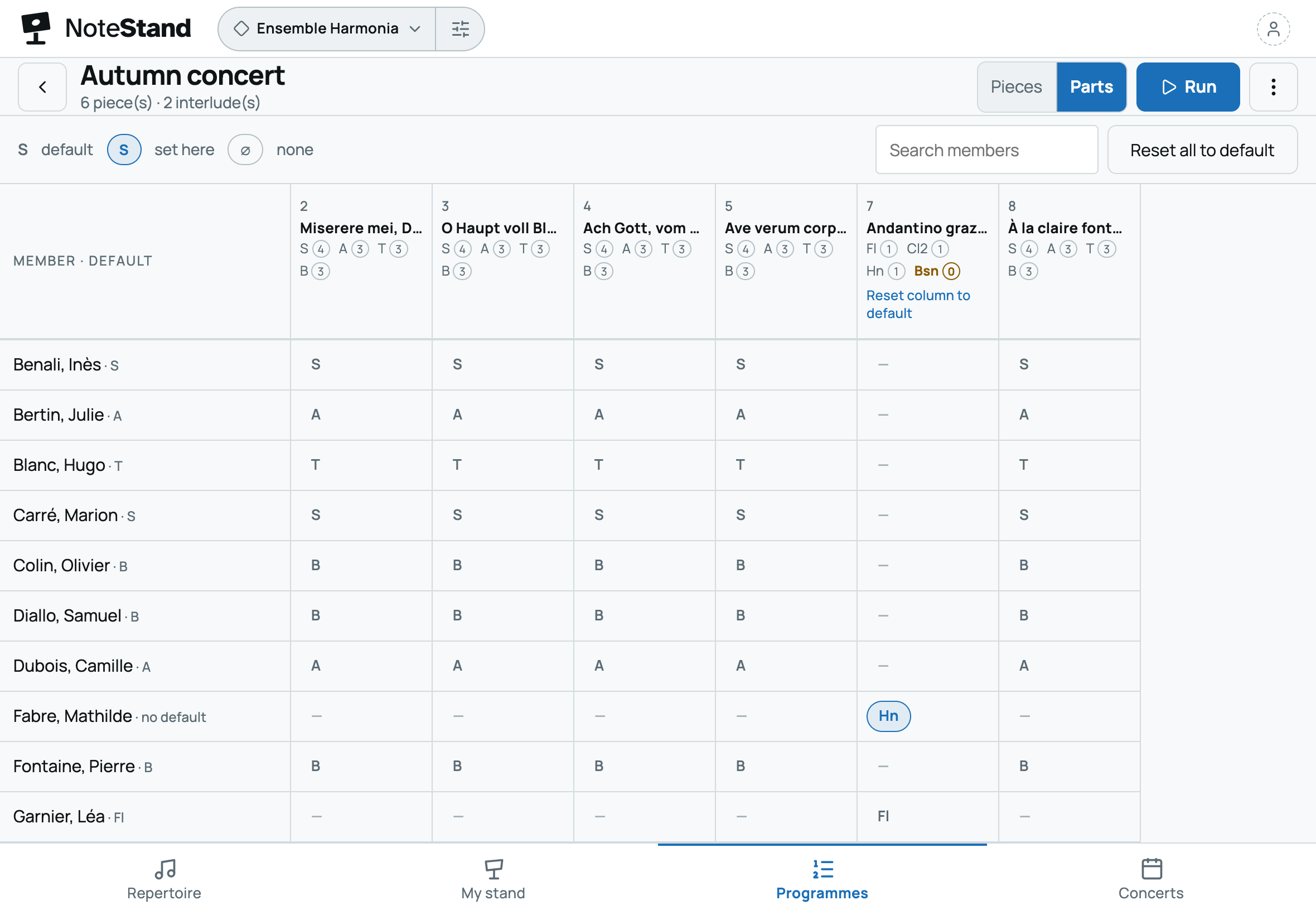
For each piece of the set list, the conductor assigns the parts: first violin on one, second on the next. Parts left without a player show at a glance, and the concert line-up reuses this assignment.

One screen for two, or one each
Two musicians of the same desk can read from one tablet: on a shared screen, their part stays highlighted if they are in the same section. Or everyone reads on their own device, with the same up-to-date repertoire.
- Pages turn with a Bluetooth page-turn pedal or a swipe, the next item announced.
Practise your part at home
In My stand, everyone opens the pieces of the set list. On an engraved score, they mute the other parts, bring up their own and pick the instrument that plays it, among 38 recorded instruments — strings, winds, piano.
- Transposition is set for the piece, or for a single session.
The audience programme, from one concert to the next
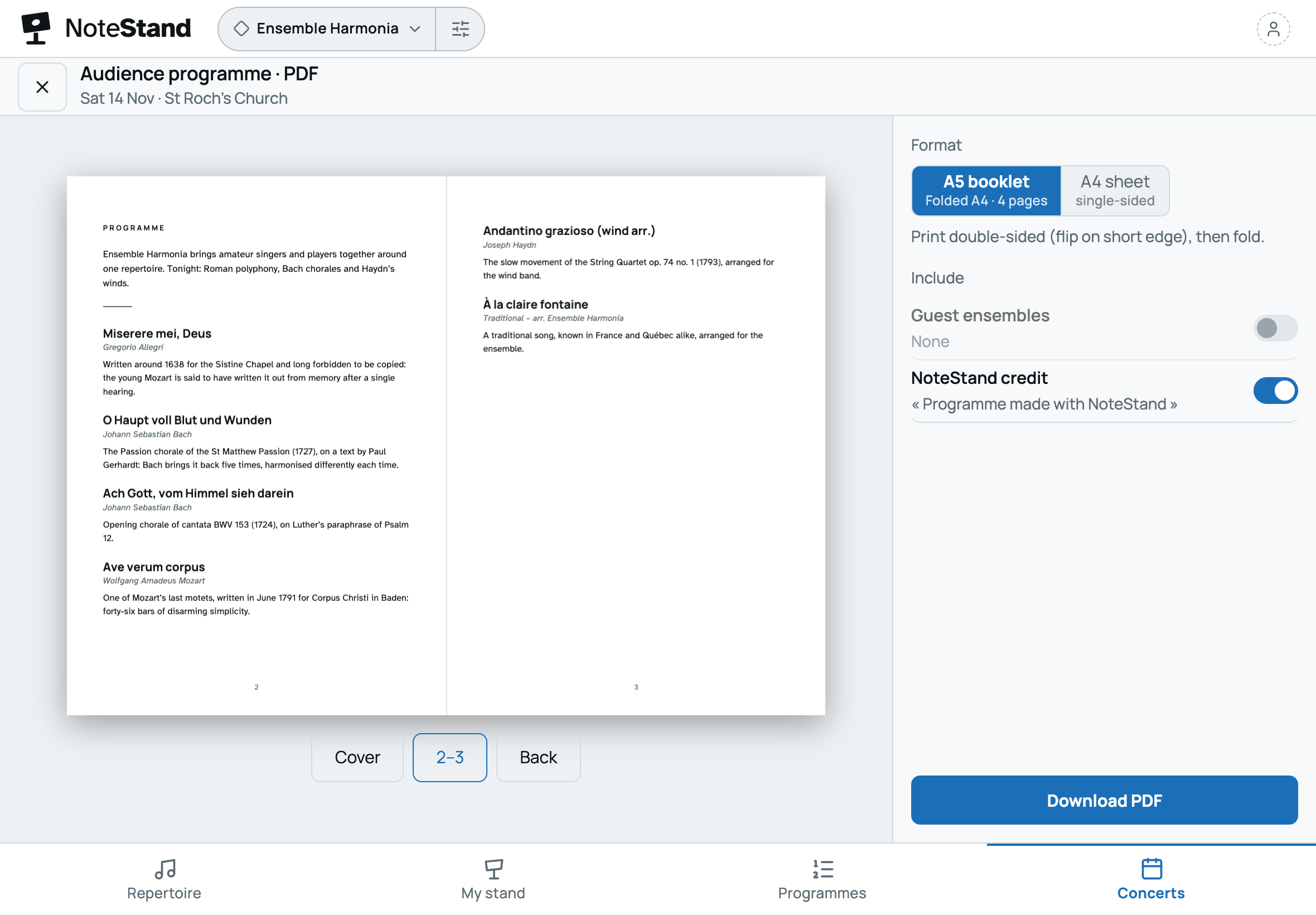
Titles, composers and an introduction to each piece, written once in the repertoire, serve every concert that plays it: A5 booklet, A4 sheet or online page with a QR-code poster.
- The orchestra’s introduction and logo, if you want them; guest ensembles too.

An example
A season with NoteStand: a forty-five-strong orchestra prepares its autumn concert
A conductor, a chair, forty-five musicians, a set list and one concert: here is how NoteStand is used, from September to the rights declaration.
- SeptemberThe conductor, on her computer
She creates the orchestra’s space and imports the repertoire: parts found on IMSLP, with their licence, a full score, a piece in MusicXML. Each part is tied to its desk. Then she prepares the set list and assigns the parts, piece by piece.
- The next dayThe musicians
Everyone gets the invitation by email, opens NoteStand on their tablet, computer or phone, and picks their section. In every piece, they find their part. Those who prefer paper print the space’s PDFs.
- Every WednesdayIn rehearsal
In the strings, two musicians read from one tablet, their part highlighted; in the winds, everyone has their own device. Pages turn by pedal. After the session, the conductor marks the agreed bowings on the shared layer: every violinist has them next time.
- Between rehearsalsA violist, at home
In My stand, he opens the pieces of the set list. On the piece engraved in MusicXML, he mutes the other parts and works on his own, played by the instrument of his choice. He adds his own cues, which only he sees.
- A month beforeThe chair and the conductor
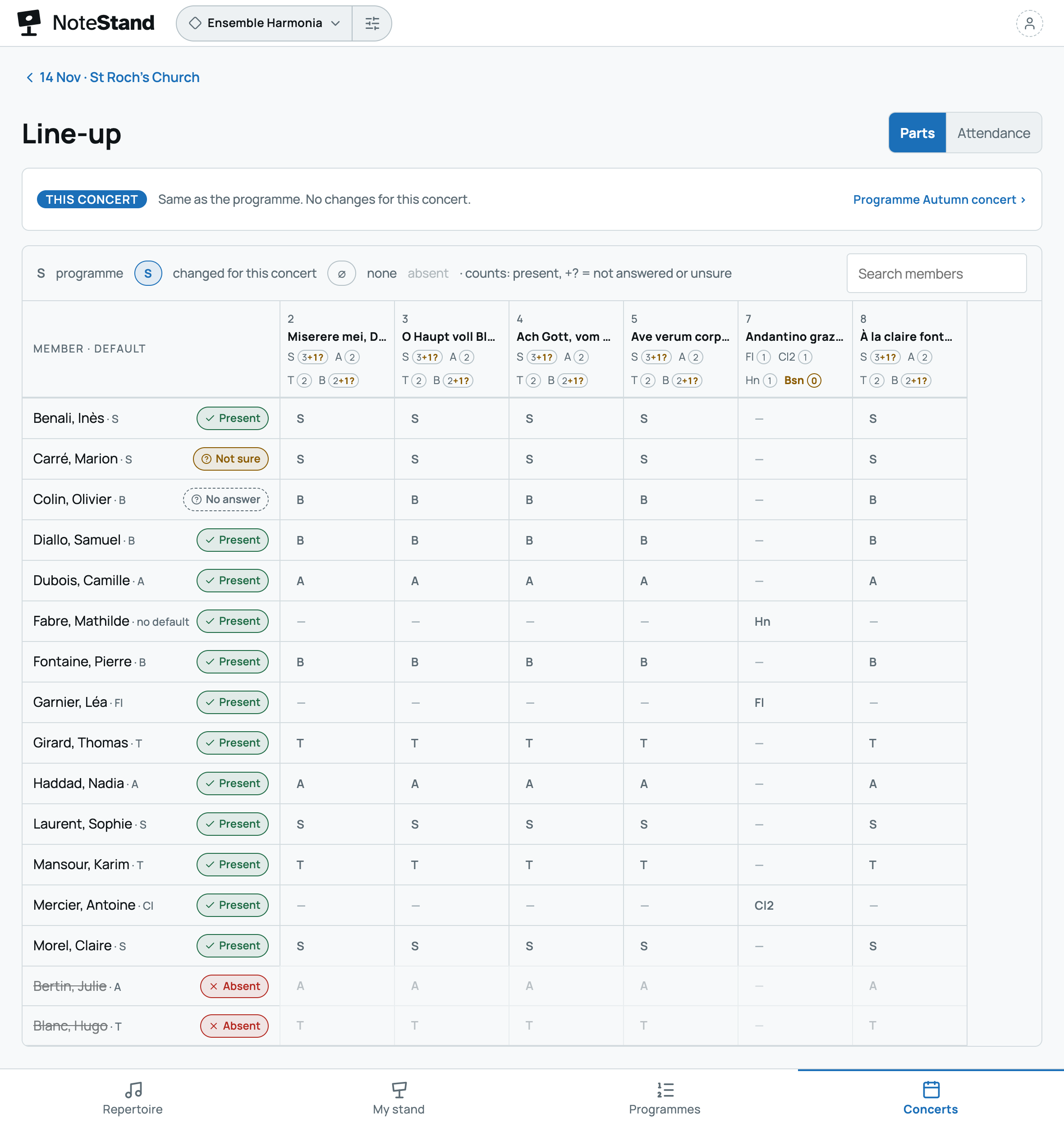
The chair announces the concert: everyone answers present, not sure or absent, and a reminder goes to those who haven’t answered. The line-up flags a part without a player: the conductor gives it to someone else, whom NoteStand tells in one tap. Organise the concerts ›
- Concert nightOn stage and in the hall
Everyone follows the run, pages by pedal, in stage mode. In the hall, the audience has the programme and each piece’s introduction, in a printed booklet or online, from the poster’s QR code.
- The next dayThe chair
He exports the programme of the works actually performed, ready to copy into the rights declaration. Declare ›
Frequently asked questions
Your questions about NoteStand for an orchestra
Does every musician have to pay or install an app?
No. The orchestra takes one subscription; every musician receives an invitation, creates a free account and opens NoteStand in their browser, or installs it in a few seconds (see how).
Our parts come from IMSLP: how do we import them?
IMSLP is searched from NoteStand. The file downloads from the IMSLP site, then imports: the piece keeps the IMSLP page’s address and the edition’s licence.
Can two musicians read from the same tablet?
Yes. On a shared screen, no part is highlighted, unless both readers are in the same section: their part then stays highlighted.
Which pedal turns the pages?
A Bluetooth page-turn pedal: it works like a keyboard, turning pages and moving the run on, hands on the instrument.
Some musicians play in several orchestras.
With a single account, they move from one orchestra to the other; their section and settings follow each orchestra, and they pay for none.
Our orchestra has more than fifteen musicians: how does the trial work?
The trial gives six months for a fifteen-member space. For a bigger orchestra, start with the conductor and a few musicians, then choose the plan that fits to invite everyone. Without a subscription at the end of the trial, the space becomes read-only: nothing is deleted.
Your next rehearsal, the bowings on every desk
Create your orchestra’s space, invite your musicians and give each of them their part, with the conductor’s marks. Your first space is free for six months.
6 months free · no card needed, no commitment
Would you rather we showed you? Write to us: a short demo, or your space set up with you.