Wind bands and concert bands
Every part of your wind band, up to date on every stand.
Every musician finds their part — 2nd clarinet, 3rd horn, percussion —, up to date, with the conductor’s marks, on the device they already have. And concerts come together in the same place: who’s coming, who plays what, the programme handed to the audience. Musicians pay nothing.
6 months free · no card needed, no commitment
Works offline Computer, tablet, phone

Today
The small frictions of a wind band’s everyday life
Parts scattered everywhere
A set of parts per piece, dozens of PDFs, photocopies from one folder to the next: finding the right part for the right musician takes time.
Information that doesn’t get through
A cut, a repeat, a dynamic agreed in rehearsal: it doesn’t reach everyone, and the next rehearsal starts by saying it again.
Who plays what, on which piece
Two first clarinets on this march, no bassoon on the next piece: the assignment lives in a spreadsheet, or in the conductor’s head.
Turning pages while playing
Hands are on the instrument when the page has to turn, and a sheet falling during the concert shows.
Editions hard to keep track of
Scores bought from a publisher, copied for every stand: knowing what has been declared, and by whom, soon becomes a headache.
For the wind band
What NoteStand does for the musicians
Organising concerts and the rights declaration are described on the home page. Here is what serves a wind band and its musicians first.
Every musician finds their part
Every document is tied to its part or parts. Everyone picks their section — flutes, clarinets, saxophones, brass, percussion — and finds “My part” in every piece: its starting note, its staff highlighted, its document.
- If the document open doesn’t include their part, NoteStand says so and offers to open theirs.
- The full score stays a document of the piece, next to the parts, for the conductor.
The conductor’s corrections, on every copy
A cut, a repeat, a breath: marked once with a stylus on the shared layer, on the PDF part as on the MusicXML score, the whole section has it at the next rehearsal, absentees included.
- Everyone keeps a personal layer for their own cues, on top of the ensemble’s.
- A part changed after the concert was announced? NoteStand lists the musicians concerned and tells them in one tap.
Parts assigned piece by piece
For each piece of the set list, the conductor assigns the parts to the musicians: first clarinet on the march, second on the overture. Parts left without a player show at a glance.
- The concert line-up reuses this assignment, with absent musicians greyed out.

Pages by pedal
In the run, a Bluetooth page-turn pedal or a swipe turns the page: hands stay on the instrument, the page slides so you can see it turned, and the next item is announced.
- Stage mode dims the display, and the screen never sleeps.
Correct, transpose, extract a part
A wrong note in a MusicXML part is fixed in the editor, with the original PDF part beside it. Once saved, the correction is up to date for everyone.
- Transposition is set for the piece, or for a single session.
- A MusicXML score downloads as a PDF, whole or part by part, for those who stay on paper.

Editions and their rights, tracked
Each score carries a rights status, with who entered it and when. The space’s register lists the shared scores, those still to declare first, and exports as a spreadsheet.
- The programme of works performed is prepared from the concert, for the declaration.
An example
A season with NoteStand: a sixty-strong wind band prepares its spring concert
A conductor, a chair, sixty musicians, a set list and one concert: here is how NoteStand is used, from September to the rights declaration.
- SeptemberThe conductor, on his computer
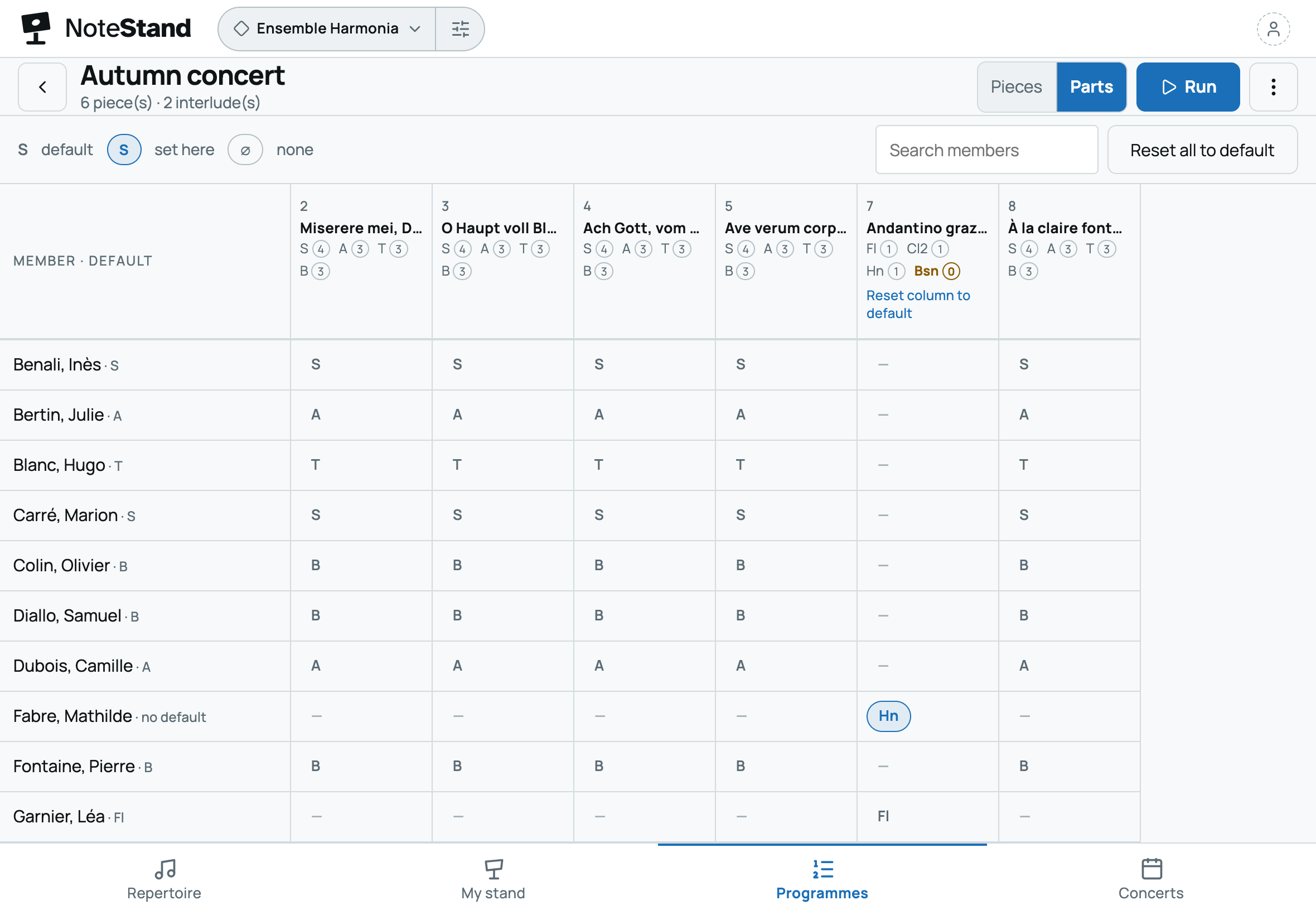
He creates the band’s space and imports the repertoire: the publishers’ full scores and PDF parts, a march in MusicXML. Each PDF is tied to its part. Then he prepares the spring concert set list and assigns the parts, piece by piece.
- The next dayThe musicians
Everyone gets the invitation by email, opens NoteStand on their tablet, computer or phone, and picks their section. In every piece, they find their part. A few prefer paper: the conductor prints the PDFs for them.
- Every FridayIn rehearsal
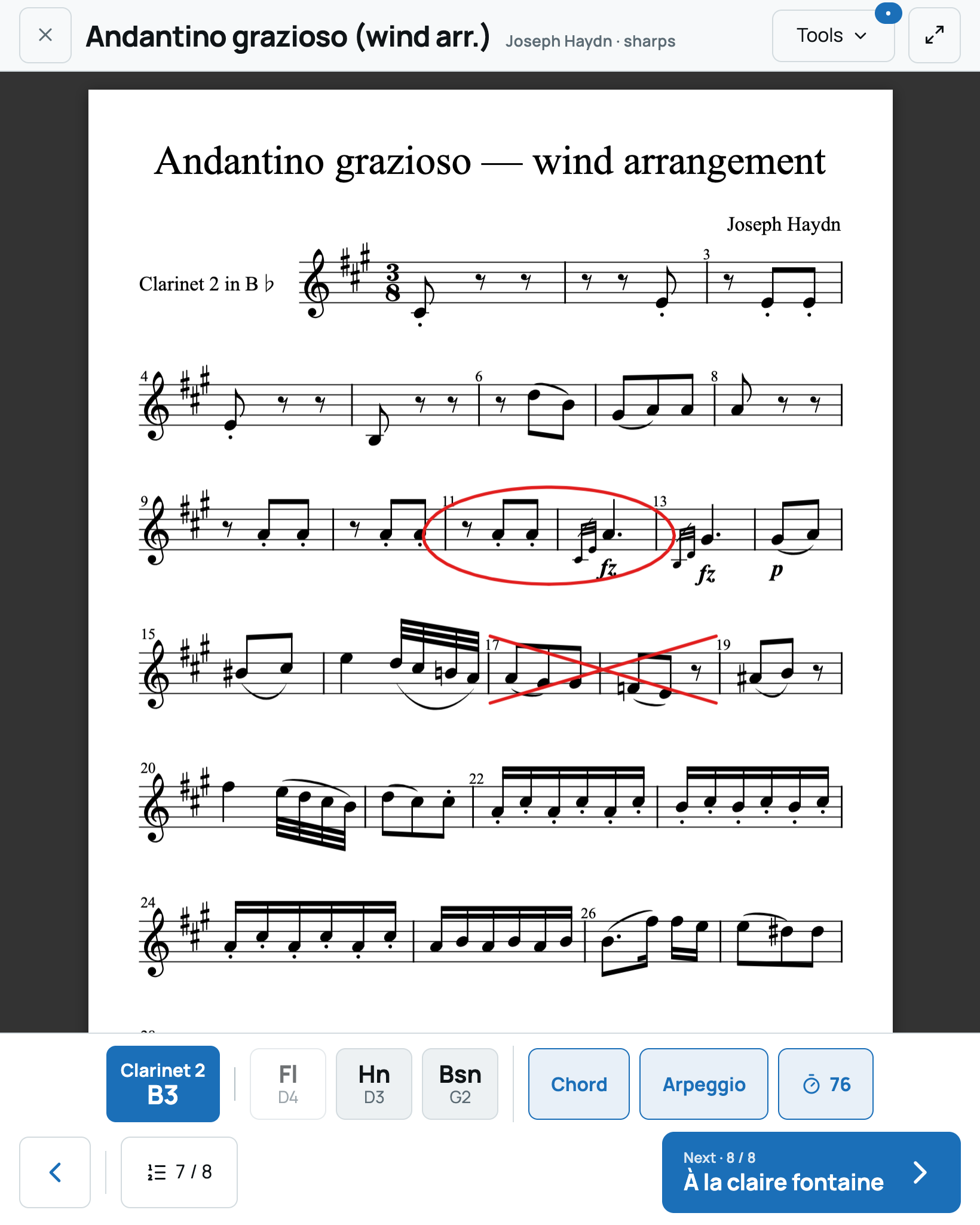
Tablets sit on the stands, pages turn by pedal. After the session, the conductor marks the agreed cuts and repeats on the shared layer. A wrong note in the second clarinet part? He fixes it in the editor, with the original beside it.
- Between rehearsalsA saxophonist, at home
In My stand, she opens the pieces of the set list. On the march engraved in MusicXML, she mutes the other parts and listens to hers, played by the instrument of her choice.
- A month beforeThe chair and the conductor
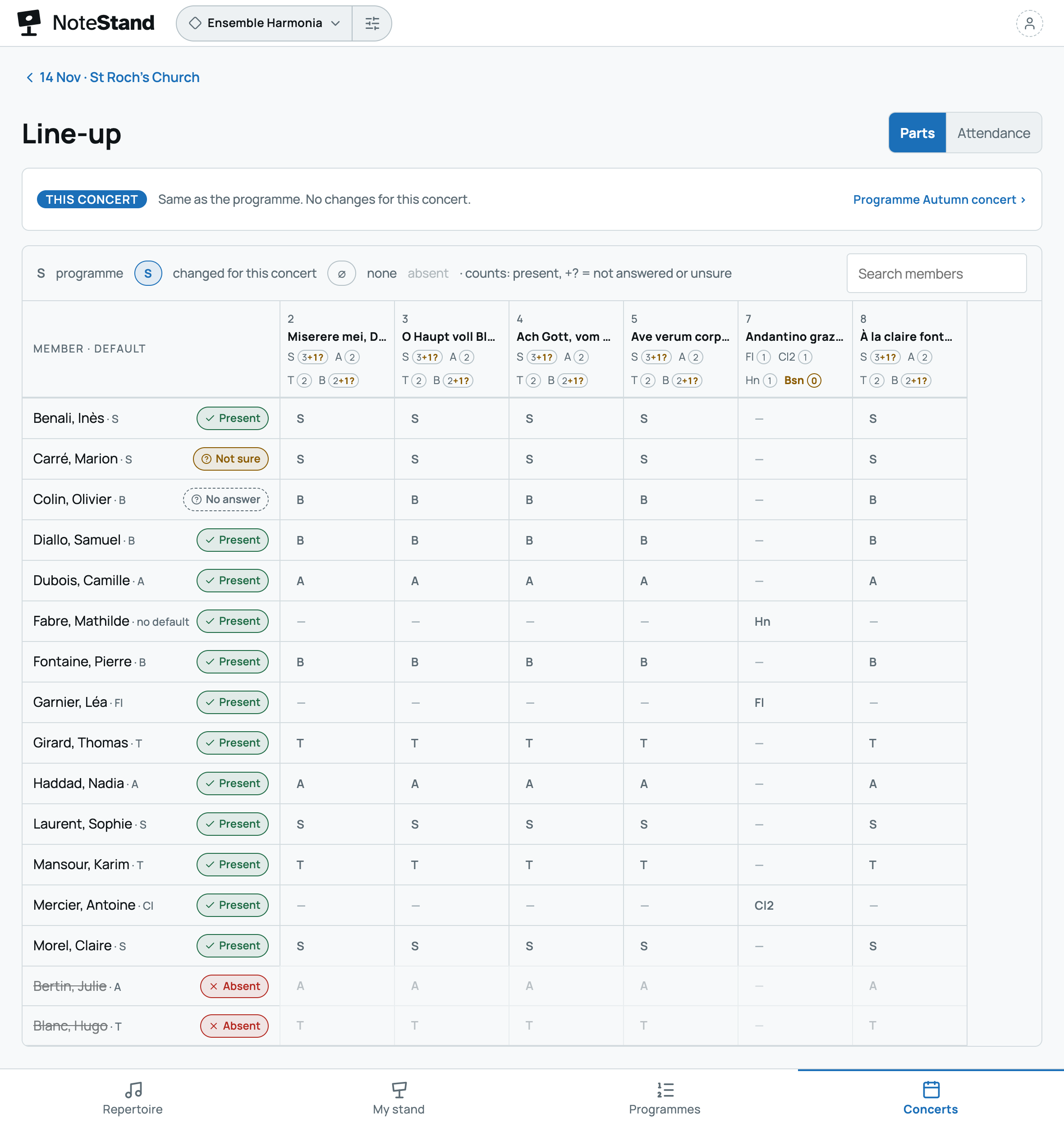
The chair announces the concert: everyone answers present, not sure or absent, and a reminder goes to those who haven’t answered. The line-up flags a piece with no bassoon: the conductor gives the part to another musician, whom NoteStand tells in one tap. Organise the concerts ›
- Concert dayOn stage and in the hall
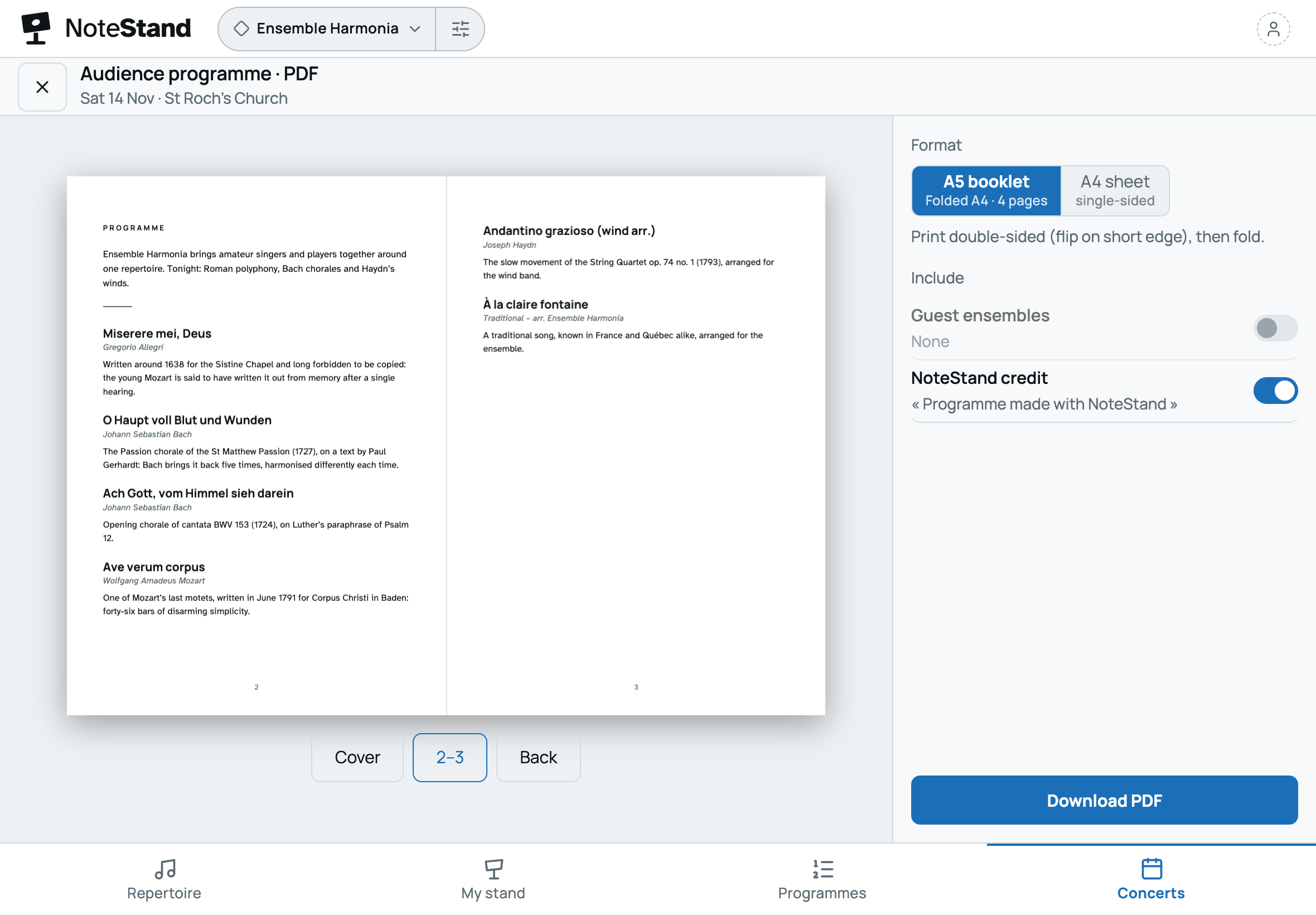
Every musician follows the run on their own device, pages by pedal, in stage mode. In the hall, the audience has the programme in a printed booklet or online, from the poster’s QR code.
- The next dayThe chair
He exports the programme of the works actually performed, ready to copy into the rights declaration, and checks each edition’s status in the register. Declare ›


Frequently asked questions
Your questions about NoteStand for a wind band
Does every musician have to pay or install an app?
No. The band takes one subscription; every musician receives an invitation, creates a free account and opens NoteStand in their browser, or installs it in a few seconds (see how).
Our parts are publishers’ PDFs: how does everyone find theirs?
Each PDF is tied to its part, or to several. The musician picks their section once; in every piece, NoteStand shows them their document, and tells them if the document open doesn’t include their part.
Which pedal turns the pages?
A Bluetooth page-turn pedal: it works like a keyboard, turning pages and moving the run on, hands on the instrument.
Some musicians also play in another ensemble.
With a single account, they move from one ensemble to the other; their section and settings follow each ensemble, and they pay for none.
What about scores under copyright?
Each score carries a rights status, and the space’s register lists the shared editions, with the number of pages and originals against the number of readers. NoteStand helps track what is declared; it doesn’t replace buying the scores.
Our band has more than fifteen musicians: how does the trial work?
The trial gives six months for a fifteen-member space. For a bigger band, start with the conductor and a few musicians, then choose the plan that fits to invite everyone. Without a subscription at the end of the trial, the space becomes read-only: nothing is deleted.
Your next rehearsal, an up-to-date part for every musician
Create your band’s space, invite your musicians and give each of them their part, with the conductor’s marks. Your first space is free for six months.
6 months free · no card needed, no commitment
Would you rather we showed you? Write to us: a short demo, or your space set up with you.